


IRONCAD Vietnam
Advanced 3D CAD Solutions for Smart Manufacturing

IRONCAD Vietnam
IRONCAD Vietnam is the representative office of Creative Machine Co., Ltd. in Vietnam, providing advanced IRONCAD 3D CAD software and engineering solutions for mechanical design, industrial equipment, factory automation, and manufacturing industries.
Target Customers:
Industrial Machinery Manufacturers | Factory Automation Integrators | Machine Builders | Precision Engineering Companies | Automotive Suppliers | Semiconductor Equipment Manufacturers | Metal Processing Companies | Engineering Consulting Firms | Manufacturing SMEs | Japanese Manufacturing Enterprises | Japanese Manufacturers Operating in Vietnam
Profile
会社名: Creative Machine Co., Ltd. (he exclusive distributor of IRONCAD in Japan and ASEAN)
URL: https://www.ironcad.jp/
Head Office: Miyazaki, Japan
Locations: Sendai | Tokyo | Nagoya | Osaka | Hiroshima | Fukuoka | Ho Chi Minh City
Established: 1961
Business Description:
IRONCAD Vietnam is the representative office of Creative Machine Co., Ltd. in Vietnam, providing advanced IRONCAD 3D CAD software and engineering solutions for mechanical design, industrial equipment, factory automation, and manufacturing industries.
Backed by Creative Machine Co., Ltd., the exclusive distributor of IRONCAD in Japan and ASEAN, IRONCAD Vietnam delivers not only software solutions but also engineering expertise developed through years of practical machine design and manufacturing experience.
Unlike conventional CAD software providers, Creative Machine is an engineering company specializing in industrial machine design, jig & fixture development, and factory automation. This practical engineering background enables the company to continuously improve IRONCAD while providing highly effective technical support and consulting services to manufacturers.
IRONCAD helps engineers significantly reduce design time through intuitive drag-and-drop modeling, flexible direct modeling technology, and a Top-Down Design approach, making it particularly suitable for machinery, automation systems, and production equipment design.
Business Activities:
- Distribution and technical support of 3D CAD software
- CAD implementation consulting
- Engineering consulting
- Mechanical equipment design
- Factory automation design
- Jig & Fixture design
- CAD training
- Technical support
- 3D modeling services
- Digital engineering solutions
Main Products & Solutions:
- IRONCAD Design Collaboration Suite
Advanced 3D CAD software for mechanical equipment and industrial machine design.
- IRONCAD Mechanical
An engineering add-on providing more than 180 productivity tools to improve mechanical design efficiency.
- icVault
Engineering document management solution for CAD data, drawings, revision control, and collaboration.
- 3D Modeling Service
Professional conversion from 2D drawings into accurate 3D CAD models by experienced engineering specialists.
Strength:
- Official IRONCAD distributor for Japan and ASEAN.
- Practical engineering experience gained through industrial machine design.
- Comprehensive solutions covering software, engineering, consulting, training, and technical support.
- Intuitive drag-and-drop 3D modeling that significantly reduces design time.
- Flexible Top-Down Design methodology suitable for machinery and factory automation projects.
- Strong compatibility with multiple CAD formats.
- Dedicated engineering team providing implementation support and design consulting.
- Continuous enhancement of engineering solutions through real manufacturing experience.
Industries Served
Industrial Machinery | Factory Automation (FA) | Precision Machinery | Robotics | Automotive | Semiconductor Manufacturing Equipment | Metal Processing | Production Equipment | Manufacturing Engineering | Industrial Design
Core Capabilities
Mechanical Design | Equipment Design | Jig & Fixture Design | 3D Modeling | CAD Implementation Support | Robot Simulation | Engineering Analysis | Design Collaboration | Digital Engineering
Main Customers:
Industrial Machinery Manufacturers | Factory Automation Integrators | Machine Builders | Precision Engineering Companies | Automotive Suppliers | Semiconductor Equipment Manufacturers | Metal Processing Companies | Engineering Consulting Firms | Manufacturing SMEs | Japanese Manufacturing Enterprises | Japanese Manufacturers Operating in Vietnam
IRONCAD – Integrated 3D & 2D Design Environment
 |  |  |
|---|---|---|
 |  |  |
 |
Main Features
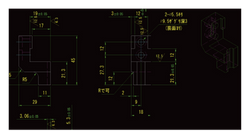
 This function allows you to create modeling by sketching, similar to general 3D CAD. Shapes not found in the standard catalog can be created using this method. |  DWG and DXF can be imported as cross-sectional views. Layers to import, such as centerlines and hidden lines, can be selected. You can also place them in 3D space and model while referencing them. |  You can create accurate curves by numerically specifying the control point positions and tangent magnitudes of splines. (Use cases: 3D sweep, guide curve loft, surface shape creation, etc.) Intersection curves, projected curves, and UV curves can also be created. |
|---|---|---|
 This function creates surface shapes from faces or 3D curves. You can also use faces from existing parts or imported models. Created surfaces can be thickened or used to cut solids. |  This function creates a single part from multiple parts. Parts can be combined, subtracted, or intersected. Even after creation, individual shapes can be edited from the history. |  Mechanical parts such as bolts, taps, special holes, bearings, springs, and gears can be easily created. |
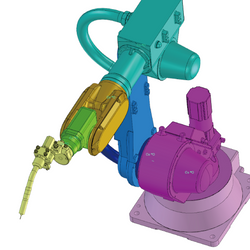 By assembling and applying placement constraints, operational verification is possible. Collisions and interferences can be checked in real-time. |  Motion simulation through animation is possible. Various animation paths are available in the catalog. It can also be used within Mechanism Mode. |  Dimensions, notes, tolerances, surface finishes, welds, and datums can be added to 3D models. These can be carried over to the 2D environment (CAXA Draft). |
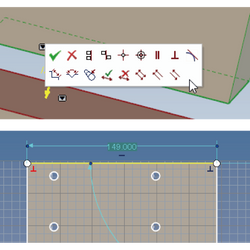 This function allows you to align parts or apply conditions such as angles when drawing in a sketch. Constraints can be applied only where necessary. | 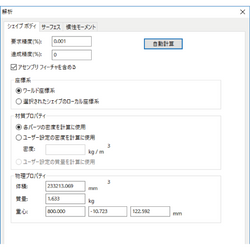 Automatic calculation of mass properties such as volume, mass, surface area, center of gravity, and moment of inertia is possible. You can define your own custom properties to create an automatic Bill of Materials (BOM). Excel output is also possible. |  By setting parameters for dimensions, etc., you can create variations of assemblies/features/parts. Values entered in the parameter table are automatically reflected. |
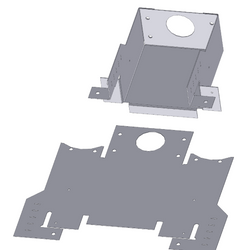 The catalog includes a variety of bending and punching shapes, allowing for drag-and-drop sheet metal design. Sheet metal parts can be created and unfolded from shelled parts or imported parts without history. It also supports reading 2D unfolded drawings, 3D conversion, and bending. |  By setting exposure, shadows, backgrounds, etc., you can realistically represent 3D space. This is useful for creating CG for presentations and brochures. |  With the automatic 3D and 2D integration function, projected views can be easily created (2D file extension is .exb). Changes to the 3D model are automatically reflected (the reverse is not possible). 3D model property information can also be output to a bill of materials. This is useful for creating assembly drawings and part drawings. |
 Dimensions, tolerances, notes, and symbols necessary for creating mechanical drawings are available. (e.g.) Dimensional tolerances, geometric tolerances, welding symbols, surface finish symbols, notes, centerlines, shaft drawing, gear drawing, and libraries for bolts, taps, etc. |  An automated hole table can be created. This significantly reduces the effort required to mark dimensions on base plates and other components that have undergone numerous tapping and hole drilling processes. |  Bills of materials and balloons linked to parts and assemblies can be automatically created. It supports both 3D scenes and 2D drawings. Output to Excel is also possible. |
An IRONCAD Logo Created by a Beginner with Only 15 Hours of Experience
4766
Interested in Joining the Network?
VN-Network is open to anyone—regardless of industry or nationality—who seeks to build partnerships based on mutual trust.
By sharing your strengths, values, and aspirations, you'll create opportunities for new connections and long-term collaboration.